# Variations in DRAM
* Asynchronous DRAM
* Video DRAM (VRAM)
* Window DRAM (WRAM)
* Fast page mode (FPM) DRAM or FPRAM
* CAS before RAS refresh
o Hidden refresh
* Extended data out (EDO) DRAM
* Burst EDO (BEDO) DRAM
* Multibank DRAM (MDRAM)
* Synchronous graphics RAM (SGRAM)
* Synchronous dynamic RAM (SDRAM)
o Single data rate (SDR)
o Double data rate (DDR)
* Direct Rambus DRAM (DRDRAM)
* Pseudostatic RAM (PSRAM)
* 1T DRAM
* RLDRAM
Asynchronous DRAM
This is the basic form, from which all others derive. An asynchronous DRAM chip has power connections, some number of address inputs (typically 12), and a few (typically one or four) bidirectional data lines. There are four
active low control signals:
- /RAS, the Row Address Strobe. The address inputs are captured on the falling edge of /RAS, and select a row to open. The row is held open as long as /RAS is low.
- /CAS, the Column Address Strobe. The address inputs are captured on the falling edge of /CAS, and select a column from the currently open row to read or write.
- /WE, Write Enable. This signal determines whether a given falling edge of /CAS is a read (if high) or write (if low). If low, the data inputs are also captured on the falling edge of /CAS.
- /OE, Output Enable. This is an additional signal that controls output to the data I/O pins. The data pins are driven by the DRAM chip if /RAS and /CAS are low, /WE is high, and /OE is low. In many applications, /OE can be permanently connected low (output always enabled), but it can be useful when connecting multiple memory chips in parallel.
This interface provides direct control of internal timing. When /RAS is driven low, a /CAS cycle must not be attempted until the sense amplifiers have sensed the memory state, and /RAS must not be returned high until the storage cells have been refreshed. When /RAS is driven high, it must be held high long enough for precharging to complete.
Although the RAM is asynchronous, the signals are typically generated by a clocked memory controller, which limits their timing to multiples of the controller's clock cycle.
Video DRAM (VRAM)
VRAM is a
dual-ported variant of DRAM that was once commonly used to store the frame-buffer in some
graphics adaptors.
Window DRAM (WRAM)
WRAM is a variant VRAM that was once used in graphics adaptors such as the Matrox Millenium and
ATI 3D Rage Pro. WRAM was designed to perform better and cost less than VRAM. WRAM offered up to 25% greater bandwidth than VRAM and accelerated commonly used graphical operations such as text drawing and block fills.
Fast page mode (FPM) DRAM or FPRAM
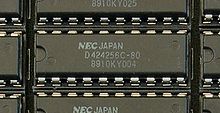
A
256 k x 4 bit DRAM on an early PC memory card. k = 1024 in this case.
Fast page mode DRAM is also called FPM DRAM, Page mode DRAM, Fast page mode memory, or Page mode memory.
In page mode, a row of the DRAM can be kept "open" by holding /RAS low while performing multiple reads or writes with separate pulses of /CAS so that successive reads or writes within the row do not suffer the delay of precharge and accessing the row. This increases the performance of the system when reading or writing bursts of data.
Static column is a variant of page mode in which the column address does not need to be strobed in, but rather, the address inputs may be changed with /CAS held low, and the data output will be updated accordingly a few nanoseconds later.
Nibble mode is another variant in which four sequential locations within the row can be accessed with four consecutive pulses of /CAS. The difference from normal page mode is that the address inputs are not used for the second through fourth /CAS edges; they are generated internally starting with the address supplied for the first /CAS edge.
CAS before RAS refresh
Classic asynchronous DRAM is refreshed by opening each row in turn. This can be done by supplying a row address and pulsing /RAS low; it is not necessary to perform any /CAS cycles. An external counter is needed to iterate over the row addresses in turn.
For convenience, the counter was quickly incorporated into RAM chips themselves. If the /CAS line is driven low before /RAS (normally an illegal operation), then the DRAM ignores the address inputs and uses an internal counter to select the row to open. This is known as /CAS-before-/RAS (CBR) refresh.
This became the standard form of refresh for asynchronous DRAM, and is the only form generally used with SDRAM.
Hidden refresh
Given support of CAS-before-RAS refresh, it is possible to deassert /RAS while holding /CAS low to maintain data output. If /RAS is then asserted again, this performs a CBR refresh cycle while the DRAM outputs remain valid. Because data output is not interrupted, this is known as "hidden refresh".
Extended data out (EDO) DRAM

A pair of 32
MB EDO DRAM modules.
EDO DRAM, sometimes referred to as Hyper Page Mode enabled DRAM, is similar to Fast Page Mode DRAM with the additional feature that a new access cycle can be started while keeping the data output of the previous cycle active. This allows a certain amount of overlap in operation (pipelining), allowing somewhat improved performance. It was 5% faster than Fast Page Mode DRAM, which it began to replace in 1995, when
Intel introduced the
430FX chipset that supported EDO DRAM.
To be precise, EDO DRAM begins data output on the falling edge of /CAS, but does not stop the output when /CAS rises again. It holds the output valid (thus extending the data output time) until either /RAS is deasserted, or a new /CAS falling edge selects a different column address.
Single-cycle EDO has the ability to carry out a complete memory transaction in one clock cycle. Otherwise, each sequential RAM access within the same page takes two clock cycles instead of three, once the page has been selected. EDO's performance and capabilities allowed it to somewhat replace the then-slow L2 caches of PCs. It created an opportunity to reduce the immense performance loss associated with a lack of L2 cache, while making systems cheaper to build. This was also good for notebooks due to difficulties with their limited form factor, and battery life limitations. An EDO system with L2 cache was tangibly faster than the older FPM/L2 combination.
Single-cycle EDO DRAM became very popular on video cards towards the end of the 1990s. It was very low cost, yet nearly as efficient for performance as the far more costly VRAM.
Much equipment taking 72-pin SIMMs could use either FPM or EDO. Problems were possible, particularly when mixing FPM and EDO. Early
Hewlett-Packard printers had FPM RAM built in; some, but not all, models worked if additional EDO SIMMs were added.
Burst EDO (BEDO) DRAM
An evolution of the former,
Burst EDO DRAM, could process four memory addresses in one burst, for a maximum of
5‐1‐1‐1, saving an additional three clocks over optimally designed EDO memory. It was done by adding an address counter on the chip to keep track of the next address. BEDO also added a pipelined stage allowing page-access cycle to be divided into two components. During a memory-read operation, the first component accessed the data from the memory array to the output stage (second latch). The second component drove the data bus from this latch at the appropriate logic level. Since the data is already in the output buffer, quicker access time is achieved (up to 50% for large blocks of data) than with traditional EDO.
Although BEDO DRAM showed additional optimization over EDO, by the time it was available the market had made a significant investment towards synchronous DRAM, or SDRAM . Even though BEDO RAM was superior to SDRAM in some ways, the latter technology quickly displaced BEDO.
Multibank DRAM (MDRAM)
Multibank RAM applies the
interleaving technique for main
memory to second level
cache memory to provide a cheaper and faster alternative to
SRAM. The chip splits its memory capacity into small blocks of
256 kB and allows operations to two different banks in a single clock cycle.
This memory was primarily used in graphic cards with
Tseng Labs ET6x00 chipsets, and was made by
MoSys. Boards based upon this chipset often used the unusual RAM size configuration of
2.25 MB, owing to MDRAM's ability to be implemented in various sizes more easily. This size of
2.25 MB allowed 24-bit color at a resolution of 1024×768, a very popular display setting in the card's time.
Synchronous graphics RAM (SGRAM)
SGRAM is a specialized form of SDRAM for graphics adaptors. It adds functions such as bit masking (writing to a specified bit plane without affecting the others) and block write (filling a block of memory with a single colour). Unlike VRAM and WRAM, SGRAM is single-ported. However, it can open two memory pages at once, which simulates the dual-port nature of other video RAM technologies.
Synchronous dynamic random access memory
Synchronous dynamic random access memory (
SDRAM) is
dynamic random access memory (DRAM) that has a synchronous interface. Traditionally, dynamic random access memory (
DRAM) has an asynchronous interface, which means that it responds as quickly as possible to changes in control inputs. SDRAM has a synchronous interface, meaning that it waits for a
clock signal before responding to control inputs and is therefore synchronized with the computer's system bus. The clock is used to drive an internal
finite state machine that pipelines incoming instructions. This allows the chip to have a more complex pattern of operation than an asynchronous
DRAM, which does not have a synchronized interface.
Pipelining means that the chip can accept a new instruction before it has finished processing the previous one. In a pipelined write, the write command can be immediately followed by another instruction without waiting for the data to be written to the memory array. In a pipelined read, the requested data appears after a fixed number of clock pulses after the read instruction, cycles during which additional instructions can be sent. (This delay is called the
latency and is an important parameter to consider when purchasing SDRAM for a computer.)
SDR SDRAM
Originally simply known as
SDRAM,
single data rate SDRAM can accept one command and transfer one word of data per clock cycle. Typical clock frequencies are 100 and 133 MHz. Chips are made with a variety of data bus sizes (most commonly 4, 8 or 16 bits), but chips are generally assembled into 168-pin
DIMMs that read or write 64 (non-ECC) or 72 (
ECC) bits at a time.
Use of the data bus is intricate and thus requires a complex DRAM controller circuit. This is because data written to the DRAM must be presented in the same cycle as the write command, but reads produce output 2 or 3 cycles after the read command. The DRAM controller must ensure that the data bus is never required for a read and a write at the same time.
Typical SDR SDRAM clock rates are 66, 100, and 133 MHz (periods of 15, 10, and 7.5 ns). Clock rates up to 150 MHz were available for performance enthusiasts.
Double data rate (DDR)
DDR SDRAM

Generic DDR-266 Memory in the 184pin DIMM form

Corsair DDR-400 Memory with heat spreaders
Double Data Rate synchronous dynamic random access memory (
or also known as DDR SDRAM) is a class of memory
integrated circuits used in
computers.
Compared to the preceding single data rate (SDR)
SDRAM, the DDR SDRAM interface makes higher transfer rates possible by more strict control of the timing of the electrical data and clock signals. Implementations often have to use schemes such as
phase-locked loops and self-calibration to reach the required timing accuracy.
The interface uses
double pumping (transferring data on both the rising and falling edges of the
clock signal) to lower the clock frequency. One advantage of keeping the clock frequency down is that it reduces the
signal integrity requirements on the circuit board connecting the memory to the controller. The name "double data rate" refers to the fact that a DDR SDRAM with a certain clock frequency achieves nearly twice the
bandwidth of a single data rate (SDR)
SDRAM running at the same clock frequency, due to this double pumping.
DDR2 SDRAM

PC2-6400 DDR2 SO-DIMM (for notebooks)
DDR2 SDRAM is a
double data rate synchronous dynamic random access memory interface. It supersedes the original
DDR SDRAM specification and the two are not compatible. In addition to
double pumping the data bus as in
DDR SDRAM (transferring data on the rising and falling edges of the bus clock signal), DDR2 allows higher bus speed and requires lower power by running the internal clock at one quarter the speed of the data bus. The two factors combine to require a total of 4 data transfers per internal clock cycle.
With data being transferred 64
bits at a time, DDR2 SDRAM gives a transfer rate of (memory clock rate) × 2 (for bus clock multiplier) × 2 (for dual rate) × 64 (number of bits transferred) / 8 (number of bits/byte). Thus with a memory clock frequency of 100 MHz, DDR2 SDRAM gives a maximum transfer rate of 3200
MB/
s.
Since the DDR2 clock runs at half the DDR clock rate, DDR2 memory operating at the same external data bus clock rate as DDR will provide the same bandwidth but with higher
latency, resulting in inferior performance. Alternatively, DDR2 memory operating at twice the external data bus clock rate as DDR may provide twice the bandwidth with the same latency. The best-rated DDR2 memory modules are at least twice as fast as the best-rated DDR memory modules.
DDR3 SDRAM
In
electronic engineering,
DDR3 SDRAM or
double-data-rate three synchronous dynamic random access memory is a
random access memory interface technology used for high bandwidth storage of the working data of a
computer or other
digital electronic devices. DDR3 is part of the
SDRAM family of technologies and is one of the many
DRAM (dynamic random access memory) implementations.
DDR3 SDRAM is an improvement over its predecessor,
DDR2 SDRAM, and the two are not compatible. The primary benefit of DDR3 is the ability to transfer at twice the data rate of DDR2 (I/O at 8× the data rate of the memory cells it contains), thus enabling higher
bus rates and higher peak rates than earlier memory technologies. In addition, the DDR3 standard allows for chip capacities of 512
megabits to 8
gigabits, effectively enabling a maximum memory module size of 16 gigabytes.
With data being transferred 64
bits at a time per memory module, DDR3 SDRAM gives a transfer rate of (memory clock rate) × 4 (for bus clock multiplier) × 2 (for data rate) × 64 (number of bits transferred) / 8 (number of bits/byte). Thus with a memory clock frequency of 100 MHz, DDR3 SDRAM gives a maximum transfer rate of 6400
MB/
s.
DDR3 is a DRAM
interface specification; the actual DRAM arrays that store the data are the same as in any other type of DRAM, and have similar performance.
DDR4 SDRAM
DDR4 SDRAM will be the successor to
DDR3 SDRAM. It was revealed at the
Intel Developer Forum in
San Francisco, 2008, that it is currently in the design phase and has an expected released date of
2012.
The new chips are expected to run at 1.2
V or less,
versus the 1.5 V of DDR3 chips and have in excess of 2 billion
data transfers per second. They are expected to be introduced at
clock speeds of 1600 MHz, estimated to rise to a potential 3200 MHz (3.2 GHz)
and lowered voltage of 1.0 V
by 2013.
In February 2009,
Samsung validated 40 nm DRAM chips, considered a "significant step" towards DDR4 development.
As of 2009, current DRAM chips are only migrating to a 50 nm process.
Direct Rambus DRAM or
DRDRAM (sometimes just called
Rambus DRAM or
RDRAM) is a type of synchronous
dynamic RAM, designed by the
Rambus Corporation.
Pseudostatic RAM (PSRAM)
PSRAM or
PSDRAM is dynamic RAM with built-in refresh and address-control circuitry to make it behave similarly to static RAM (SRAM). It combines the high density of DRAM with the ease of use of true SRAM. PSRAM (made by Numonyx) is used in the Apple iPhone and other embedded systems.
Some DRAM components have a "self-refresh mode". While this involves much of the same logic that is needed for pseudo-static operation, this mode is often equivalent to a standby mode. It is provided primarily to allow a system to suspend operation of its DRAM controller to save power without losing data stored in DRAM, not to allow operation without a separate DRAM controller as is the case with PSRAM.
An
embedded variant of pseudostatic RAM is sold by
MoSys under the name
1T-SRAM. It is technically DRAM, but behaves much like SRAM. It is used in
Nintendo Gamecube and
Wii consoles.
1T DRAM
Unlike all of the other variants described here,
1T DRAM is actually a different way of constructing the basic DRAM bit cell. 1T DRAM is a "capacitorless" bit cell design that stores data in the parasitic body capacitor that is an inherent part of
Silicon on Insulator transistors. Considered a nuisance in logic design, this
floating body effect can be used for data storage. Although refresh is still required, reads are non-destructive; the stored charge causes a detectable shift in the
threshold voltage of the transistor.
There are several types of 1T DRAM memories: The commercialized
Z-RAM from Innovative Silicon, the
TTRAM from Renesas and the
A-RAM from the
UGR/
CNRS consortium.
Note that classic one-transistor/one-capacitor (1T/1C) DRAM cell is also sometimes referred to as "1T DRAM".
RLDRAM
Reduced Latency DRAM is a high performance double data rate (DDR) SDRAM that combines fast, random access with high bandwidth. RLDRAM is mainly designed for networking and caching applications